Max effort: 3.3× the tokens, same answer.
On a 50-step calculation, medium, high and max effort all got it right. Max used 24,875 tokens, against 7,584 for medium.
Tested: Claude Opus 5.5, max, high and medium effort · Oct 2026 · Read finding 2 →
RadianVector measures and optimizes entire AI systems. We find the smartest AI setup for each task.
Powered by proprietary optimization technology and original research, RadianVector systematically explores various possibilities to identify and validate the right setup for your workloads - with research-grade rigor.
We test and optimize offline, without slowing down your production pipeline. Share only what you choose - no sensitive production data or live traces required.
Options: 249 frontier · 1,968 open-weight
Keep your production traffic private
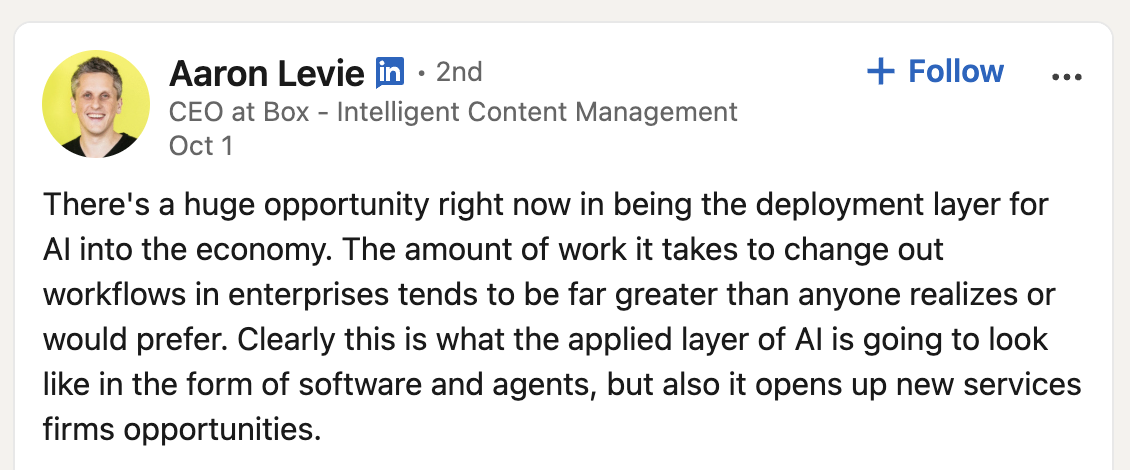
Box CEO Aaron Levie put it plainly: changing workflows for AI takes far more work than anyone expects. Workflows need re-engineering for agents, evaluations need to be built and maintained, and the whole system needs updating every time a new model arrives.
If your organization is in the middle of that change, talk to us. Measuring what works, and checking it still works after every model update, is what RadianVector tools are built for.
Choose a better model for your task.
Prices are for standard-length prompts. OpenAI, xAI and some Google and Anthropic models charge more for long prompts, above 100K to 272K input tokens depending on the model. See the long-prompt prices →
See every model, setting and price on the Model options page →
For some use cases, open-weight models work best. If your agents call a model over and over, or all your data has to stay inside your own systems, running open models is now practical, and they are capable enough for many of these tasks.
We measure and tune how open models are served, on your hardware and your workload.
We ran our own questions on models from Anthropic, OpenAI and xAI, through each vendor’s own command-line tool, and evaluated the answers. We have ten findings from October 2026, and here are a few of them.
On a 50-step calculation, medium, high and max effort all got it right. Max used 24,875 tokens, against 7,584 for medium.
Tested: Claude Opus 5.5, max, high and medium effort · Oct 2026 · Read finding 2 →
Opus hit its 128,000-token output limit before answering. Our test runner retried it three times, and each retry hit the limit again. After 514,985 tokens, there was still no answer.
Tested: Claude Opus 5.5, max effort · Oct 2026 · Read finding 1 →
On a 700-step calculation at its highest setting, GPT-6 Astra got it right with its built-in tool, and wrong without it.
Tested: GPT-6 Astra, xhigh effort · Codex (0.154.0) · Oct 2026 · Read finding 4 →
Measured answer quality, request timings and serving behavior, including a tested vLLM fix.
The same setup, run more than once, gave SGLang two speeds. When all the requests reached it together, it kept pace with vLLM and TensorRT-LLM. When one request arrived a few milliseconds early, SGLang made 3 requests wait, and total throughput fell by 40%.
Swipe to see all columns.
| Measurement | vLLM 0.30 | SGLang 0.5.20 | TensorRT-LLM 1.3.0rc29 |
|---|---|---|---|
| KV pool | 32,336 tokens 47,888 on a second start | 32,096 tokens | 37,760 tokens |
| Most running at once | 32 | 32 | 32 |
| Output tokens per second | 1,274 | 1,342 | 1,389 |
Count what ran, not only the speed. The SGLang column shows a fast run. With the same load, the same SGLang server sometimes ran only 29 requests, kept the rest waiting, and produced 799 output tokens/s. Across repeat runs, fast runs gave 1,337–1,356 and slow runs 795–811. We first saw the difference between two benchmark clients and traced it to how SGLang’s scheduler starts requests. SGLang vs vLLM, the deep dive →
See the full engine comparison and run details →Results at levels 5 and 6 of our difficulty ladder, on the RTX 4090 GPU family.
Swipe to see all columns.
| Model | Level 5 | Level 6 |
|---|---|---|
| gpt-oss-20b, high effort | 25/28 | 22/28 |
| Qwen3.8-27B, 4-bit | 21/28 | 21/28 |
| Qwen3-8B, 4-bit | 18/28 | 10/28 |
| GLM-4.7-Flash, 4-bit | 14/28 | 6/28 |
The tool report separates time spent waiting from time spent generating.
Swipe to see all columns.
| Requests open | Running | Wait for first token median | Time to completion mean | Time generating median |
|---|---|---|---|---|
| 1 | 1 | 0.05 | 4.8 | 4.8 |
| 2 | 2 | 0.13 | 5.3 | 5.2 |
| 4 | 4 | 0.11 | 5.5 | 5.4 |
| 8 | 8 | 0.11 | 5.6 | 5.5 |
| 16 | 10 | 3.1 | 8.8 | 5.8 |
| 32 | 10 | 11.8 | 16.6 | 5.8 |
At 8 open requests, mean completion time was 5.6 s. At 32, it was 16.6 s, while median generation time changed only from 5.5 to 5.8 s. Only 10 of the 32 requests were running; the others were waiting in line.
See all timing measurements →MTP speculative decoding repeated tokens under load. We traced the cause to the model runner, patched it and reran the tests.
Swipe to see all columns.
| Configuration | Different replies before → after | Repeated-token replies before → after |
|---|---|---|
| vLLM 0.28 · MTP-1 | 60 → 11 | 29 → 0 |
| vLLM 0.28 · MTP-3 | 77 → 6 | 26 → 0 |
| vLLM 0.30 · MTP-1 | 39 → 8 | 13 → 0 |
Repeated-token replies fell to zero in these patched runs. “Different replies” counts token-for-token differences from the no-speculation run; it is not a correctness score.
Read the fix and full results →Offline evaluation compares AI configurations outside your live production pipeline. RadianVector tools support hosted model APIs and self-hosted open models, so you can measure answer quality, response time and cost before deploying a change.
Which model and prompt combination meets your requirements? Where does reasoning effort help? What changes when the output format or supplied context changes?
For engineering teams improving hosted-model applications, retrieval workflows and agents.
Where do requests queue? Does quantization change the answers? How do cache settings and concurrency affect latency, throughput and GPU use?
For teams serving open-weight models with vLLM, SGLang, TensorRT-LLM or llama.cpp on their own infrastructure.
RadianVector compares performance and behavior on the same workload. See which tasks each configuration completes, where it fails and how much time and compute it uses.
Explore the engineering behind the measurements →Compare task results against your requirements. See successful completions, important errors and the tasks each configuration struggles with.
Compare models, prompts and supported reasoning settings on the same questions. Measure where a change improves answers and what it costs in time and money.
Use inferlint to inspect request queues, memory use and concurrency, and understand what your inference server actually did.
Inspect inferlint and an example report →Test before and after a change. See what improved, what regressed and how response time and cost shifted.
A study starts from 1,000 representative questions about the documents. It screens 10 model and reasoning-level settings with 5 prompt variations, then tests output formats and sampling settings on the promising candidates.
Measure the current setup on representative questions.
Narrow the search using the quality and cost requirements.
Test the finalists on held-out cases and repeat runs to check stability.
Provide configurations, measured trade-offs and failure examples.
Reach out and send us a note. We’ll take it forward from there.